
What is WinHelp?
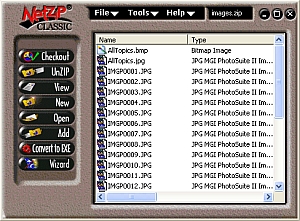
Essentially, WinHelp is an electronic technical help manual that accompanies a major software application, and offers context-sensitive help. WinHelp can only be run on PCs running Microsoft Windows. Any given topic could contain hyperlinks, pop-ups, or illustrations with hot spots. The PaneHelp opens as a separate pane next to the application, as pictured below.
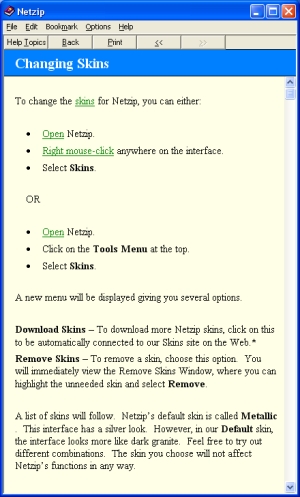
Topic: Changing Skins
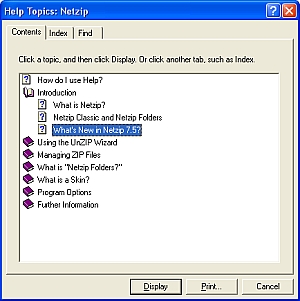
When the user clicks on Help Topics from a topic like the one shown above, the WinHelp interface changes to what you see here, with a Contents, Index and Find tab.
- The Contents tab is the table of contents. I try to keep all critical information no further than three clicks away from the user.
- The Index tab is a specified list of terms that the developer (me) decides would best help the user. Studies show that 80% of WinHelp users go straight to the Index tab.
- The Find tab allows a complete textual search throughout the entire help. However, the developer can decide if certain topics are hidden from this search.
How did you develop the WinHelp?
The WinHelp was developed using RoboHelp, an industry standard in help authoring. RoboHelp is a project management application that helps the developer setup and track all the variables in a WinHelp system, including:
- Hyperlinks
- Table of contents
- Index key words
- Browse sequences
- Related topics
- Pop-ups
- Button preferences
- User options
- Illustrations (images)
- Compression methods
- And more…
What does RoboHelp look like, and how does it work?
RoboHelp works in conjunction with Microsoft Word. I am proficient in RoboHelp 2000 and previous. However, the image below shows an older version of RoboHelp.
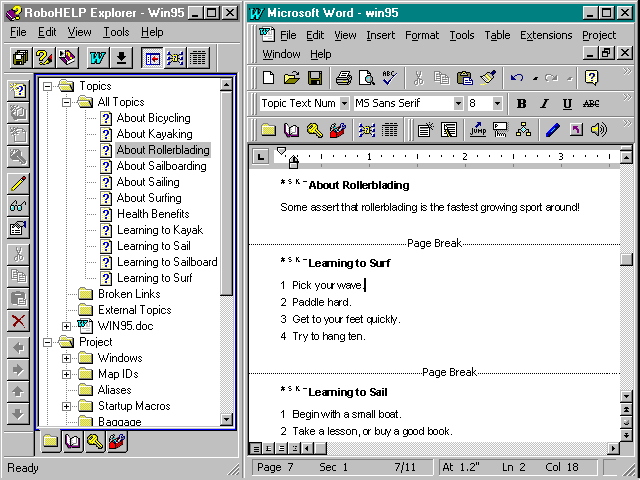
RoboHelp is the left pane, and Microsoft Word is the right pane. When you double-click a topic on the left, it jumps to the appropriate topic in Word on the right. Each page break represents another topic.
These topics are saved to an .RTF file (or files, depending upon the project), and later this is converted and compressed into one single file, the .HLP file. This file is served locally on the user’s computer. RoboHelp also generates the table of contents as an auxiliary file. Some developers choose not to use a table of contents, but I always included this in my Help projects.